
The final “What’s !important” issue ends the column and promotes the CSS-Tricks newsletter launching Nov. 10. The issue covers GTA 6 scroll animations, modern CSS scrollspies, random() demos, 2026 icon strategies, universal pseudo-selectors, design-system features, adaptive textareas, and new gradient specifications.
The CSS-Tricks team released the final installment of “What’s !important” this week. The team closes the column and moves the content to a newsletter that launches Nov. 10. Readers who subscribe will receive hand-written, hand-curated links, editorials, and platform updates unavailable elsewhere on the site. The team paused the newsletter for four years; they now relaunch it.
The editors saved several technical deep-dives since they revived the site earlier this week. Kevin Powell walked through the scroll effects on the . Users cannot load the site in Firefox, but it displays layered animations that Rockstar refined over 13 years. Powell breaks down the implementation for developers who want similar results without waiting for the game.
Mojtaba Seyedi demonstrated a scrollspy built with modern CSS. Seyedi’s scrollspy highlights the active navigation link as users scroll through page sections. He skips JavaScript and relies on native CSS features to track position and update states.
Brecht De Ruyte showcased demos using CSS random(). The function generates random values inside stylesheets, producing patterns that change without external scripts. The examples show complex visual effects that respond to the function’s output.
Lea Verou detailed icon implementation strategies for 2026 and beyond. She examined SVG and icon fonts, then mapped emerging CSS features including Linked Parameters, ident(), @mixin, @apply, and the @property shorthand. Her analysis connects current practices to future specifications and explains how these tools change component architecture.
Kilian Valkhof proposed a universal pseudo-selector: ::*. The current universal selector (*) skips pseudo-elements such as ::before, ::after, ::backdrop, and ::details-content. Developers now write *, ::before, ::after { box-sizing: border-box; } for every reset. Valkhof’s ::* covers all pseudo-elements in one declaration, reducing repetition as specifications introduce more pseudo-elements.
Declan Chidlow identified HTML and CSS features that strengthen design systems. His favorites include text-box, sibling-index(), sibling-count(), @scope, and @custom-media. These tools reduce repetition and improve component consistency across large codebases.
Adam Argyle shared a CSS trick that lets <textarea> elements adapt to their content height. The technique uses anchor positioning. Argyle’s solution eliminates JavaScript resizing scripts and keeps forms responsive.
Temani Afif created wavy dividers using random() and shape(). Afif uses the combination to produce organic borders that change with each render, giving layouts a dynamic edge.
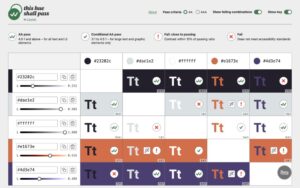
The issue also highlights new tools. “This hue shall pass” checks color contrast ratios. Users can distinguish Fail from near-pass states and adjust lightness until combinations meet AA or AAA standards. built the checker.
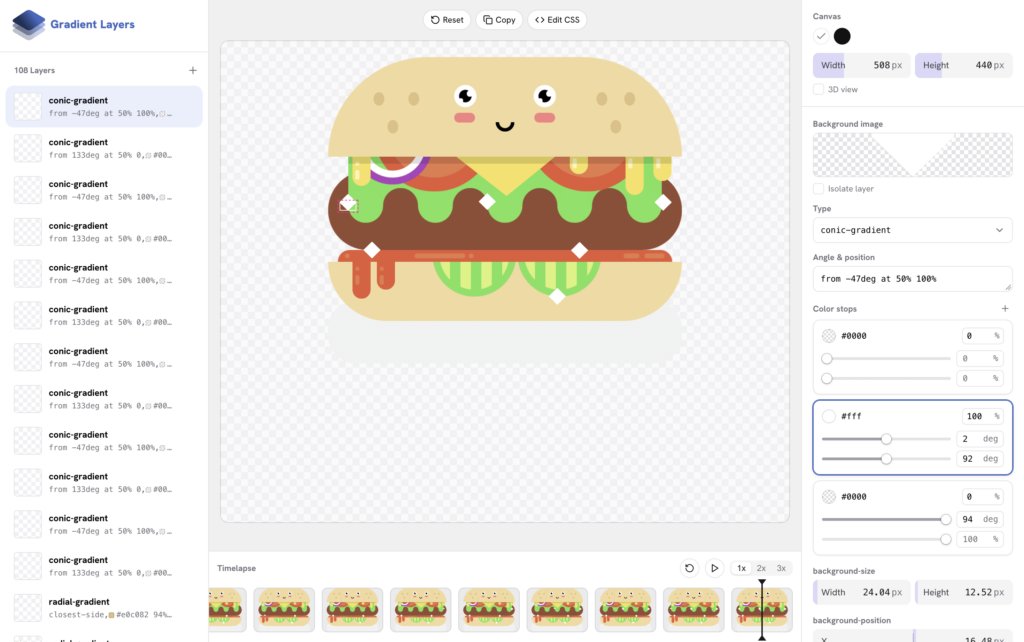
Ahmad Shadeed released Gradient Layers, a visual editor for CSS gradients. Users edit multi-layer gradients or build new ones from scratch without writing code by hand.
Josh Tumath explained two new gradient types coming to browsers: mesh-gradient() and freeform-gradient(). The syntax allows complex color blending beyond linear and radial patterns.
background-image: mesh-gradient(red, blue; green, yellow);

background-image: freeform-gradient(red top left, yellow bottom right);

These new types expand design possibilities. Tumath’s images demonstrate the visual potential of mesh blending and freeform placement.
The newsletter also lists recent browser updates. Chrome 155 added margin-trim and symbols(), plus text-decoration-skip-spaces. Firefox 158 brought JPEG XL to Baseline and CSS typed arithmetic. Chrome 156 introduced random() and :navigation-source. Safari 27.1 delivered CSS features for the iPhone Duo. Firefox 159 added scroll-driven animations to Baseline.
The team confirmed the newsletter launches Nov. 10. The first issue arrives after a four-year hiatus. Subscribers receive the same curated content with direct delivery and a sponsor.