
Hi
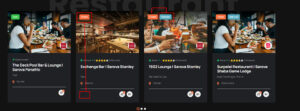
Anyone care to share a custom css code to change the position of the ‘Open/Closed’ label on the Elementor listing slider card module from top left to bottom left ?
The change should apply to Slider Card module on the Home Page & Listing page.
/* Home page
Listing page
Also, the ’Featured’ label should shift to Top Left.
Fyi, I have disabled the ‘price feature’ of the listings therefore leaving a empty space.
Thanks in advance.
Unfortunately this is not really viable as the structure doesn’t allow for the buttons to be placed outside their current content with exact certainty. I can give you a “Magic Number” fix but will not be 100% reliable should content change as it relies on things being where they are all the time.
I suggest you put the following code somewhere where you can easily extricate it all should something go wrong.
/* home page */
.listing-one__single{
    position:relative;
}
.listing-one__image,
.listing-one__labels{
    position:static;
}

.listing-one__label.listing-one__time.open,
.listing-one__label.listing-one__time.closed{
    position:absolute;
    bottom:2rem;
    left:25px;
}
.listing-one__label.listing-one__featured{
    position:absolute;
    top:20px;
    left:20px;
}
.listing-one__logo{
    bottom:auto;
    margin-top:-5rem;
}
.listing-one__image:after{
    height:100px
}
.listing-one__title a {
    min-height: 55px;
}
.listing-one__meta-top{
    min-height:35px
}


/* listing page changes */

.listing-five__image{
    position:relative;
}

.listing-five__labels{
    position:static;
}

.listing-five__label.listing-five__time.open,
.listing-five__label.listing-five__time.closed{
    position:absolute;
    left:calc(100% + 28px);
    top:auto;
    bottom:1rem;
}
.listing-five__label.listing-five__featured{
    position:absolute;
    top:20px;
    left:20px;
}
With that code in place the pages will look like this assuming nothing has changed since.
As I said it relies on magic numbers because the elements were inside positioned contexts and in css you can’t move out of a positioned context as it is tied to the positioned parent. The code works by using a magic number to get it into position but that is an unreliable way to code. It may suffice but there are no other choices other than changing the html so what you want can be achieved.
Hi Paul
The css code works like a charm. 
I’m happy to use css code until such time I figure out to modify the source code in the template file.
Meanwhile, can you share the css code to change the b/g colour of the ‘Closed’ label from orange to red (##FF0000)
Also, share the css code to change the b/g colour of the ‘Featured’ label to black with 50% transparency & text colour to orange (#ff6e3d) ?
Thanks