
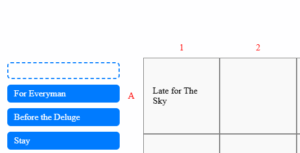
I have a which was created by ’s in response to my question back in 2023. Here’s the from where I got the codepen.
In the above codepen, when we drag a blue rectangle box on the squares, it is possible to move the dropped blue rectangle content within the squares. For example, if I want to drop the blue rectangle containing Late for The Sky on the square A1, it will look like this:
And I can hold the content of A1 and drag and drop it to A2 or any other cell as per my wish. And I was looking at the code Js code in the codepen that does this.
Modified Version:
I have a modified version, where I’m putting things on the square, using a button click and not dragging a blue rectangular text box as shown in . Steps are shown below:
- We select an option from the
Select Optionsdropdown menu.Option Onehas already been selected for our convenience. - We select a color for the background. It doesn’t work in the JSFiddle but it does work in my actual code so we can ignore that for time being.
- We click
Show Optionsbutton to list the options associated withSelect optionsdropdown. - We enter a row
A-H, for example, A - We enter a column number from 1-12 , for example 1
- We hit the calculate button and then click on move text content button which moves the content on the squares.
Now after the contents are on the squares, if I try to move any cell content to an empty cell, it won’t move . I still have the UI draggable code in my starting from line 40 (revert function is not needed as I’m using button based approach like in the code pen shown above but I still have kept it as it is)
What things I may need to keep in mind in order to move the content of cells on any other empty cell?Or why it is not working with the modified version?
Oh no not this again 
I guess its because the content you are trying to move doesn’t exist when the draggable code is first run. Maybe you could call the draggable after you create the content. e.g. Put it in a function and then call it when you have created the items.
If that doesn’t work then wait for one of the JS gurus to pop in as there may be better solutions.
Didn’t we already create something with buttons and some very convoluted reasoning for placing the content in half columns? I seem to have a load of these half demos that I now have no idea of what they were doing
Maybe like this:
I added the call next to where you have this comment:
...etc
    // $("#phrase").append(html);
     getPhrase()  /* I added this here to call draggable as the items now exist */
...etc
/* then I wrapped a function around this existing code */
function getPhrase() {
  $(".words").draggable({
    revert: function (event, ui) {
      var bRevertingPhrase = this.closest("#drop-em")

      if (!bRevertingPhrase.length) {
        var phraseID = $(this).data("id")
        var phraseHomeID = $(this).parent().data("id")

        //If the child and parent ids don't match, we move the child to the correct parent
        if (phraseID !== phraseHomeID) {
          var correctCell = $("#phrase").find("div[data-id='" + phraseID + "']")
          correctCell.prepend(this)
        }
      }
      return !event
    },
  })
  $("#drop-em > div").droppable({
    drop: function (ev, ui) {
      $(ui.draggable)
        .detach()
        .css({ top: 0, left: 0 })
        .appendTo($(this).find(".content:empty"))
      //$("#move-text").addClass("disabled");
    },
  })
  $("#phrase > div").droppable({
    drop: function (ev, ui) {
      $(ui.draggable).detach().css({ top: 0, left: 0 }).prependTo(this)
    },
  })
} /* close new function*/